View network status
Soft-Switch VoIP APPWindows desktop application

Enterprise communications for Windows

Business calling.
One professional
workspace.

Give every user a secure, consistent way to call, collaborate and serve customers—connected directly to your managed Soft-Switch VoIP APP platform.

  • Yealink headset call control
  • Automatic caller screen pops
  • Windows Click to Call
  • Managed enterprise rollout
  • Secure, verified updates
  • UK engineering and support
Soft-Switch VoIP APP
SERVICE CONNECTED
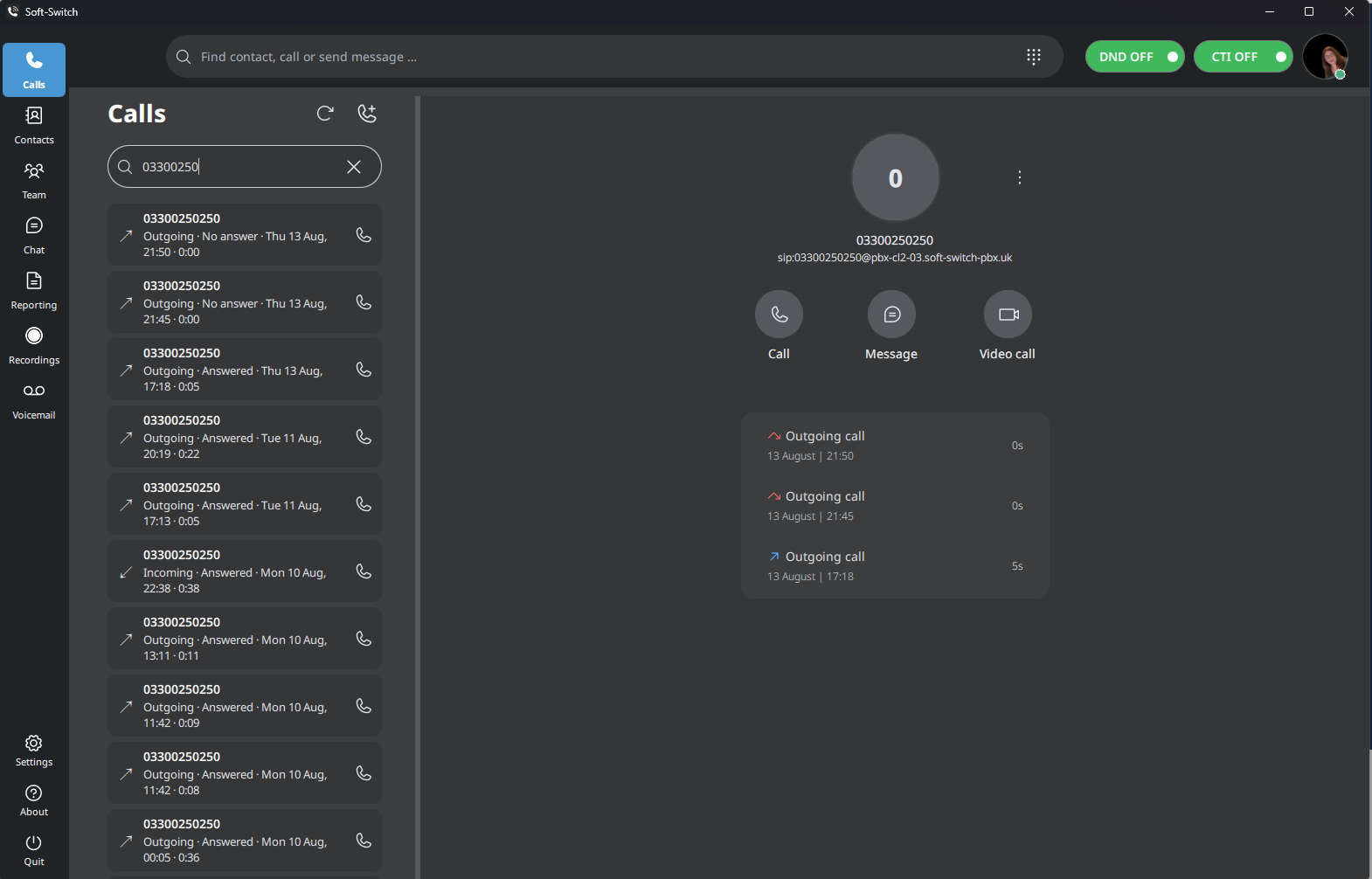
Soft-Switch VoIP APP showing call history, contact search and call controls
VOICE SERVICERegisteredReady for business calls
TEAM PRESENCELiveAvailability at a glance
WINDOWS RELEASEv2.0.56Verified x64 installer

Professional business calling

01 / CALLING

Every conversationstarts with clarity.

Give users one dependable Windows workspace for customer calls, colleague conversations and day-to-day call control—connected directly to your managed communications service.

  • Find and connect quicklySearch contacts, numbers and recent conversations from one place.
  • Yealink headset call controlAnswer and end calls using the supported buttons on a connected Yealink headset.
  • Simple CRM screen poppingOpen a configured web page automatically for call events and pass the caller’s phone number—without enabling or setting up a CRM integration.
  • Stay in control of the callHold, transfer, forward and manage availability without changing tools.
  • Work with one business identityKeep company numbers, extensions and routing consistent across the organisation.
01
Soft-Switch VoIP APP
VOICE REGISTERED
Soft-Switch VoIP APP business calling workspace
CALL WORKSPACESearch · Connect · Control

Connected call workflows

Control every call.Connect every workflow.

Answer and end calls from a supported Yealink headset, start calls directly from telephone links, and open customer web pages automatically at key call events.

01

Yealink headset support

Use the supported buttons on a connected Yealink headset to answer an incoming call and end it when the conversation is complete. Users can stay focused on the customer instead of returning to the mouse for basic call handling.

Support depends on the connected Yealink headset and its available call-control buttons.
02

Call Control screen popping

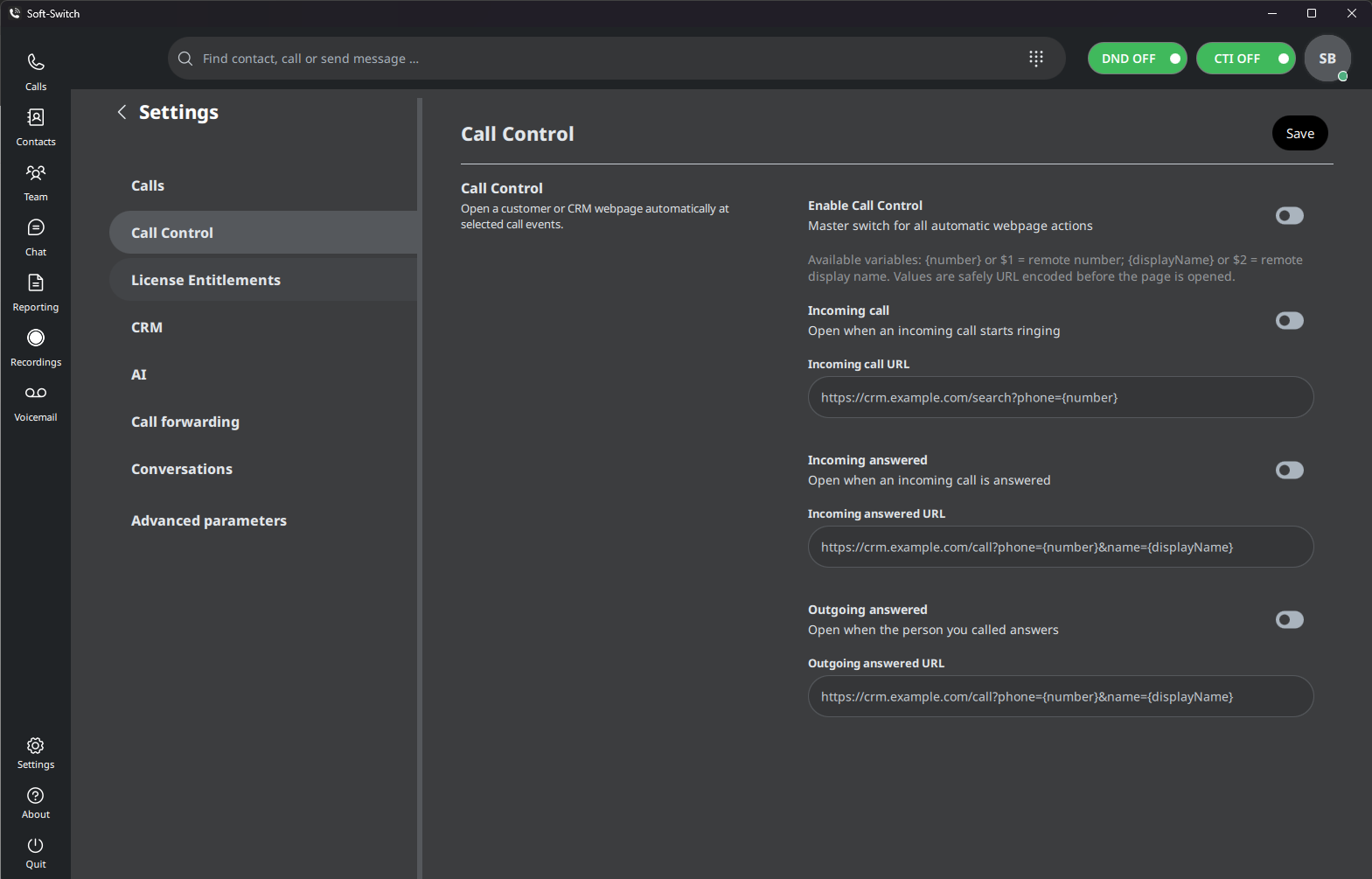
Configure the app to open a customer or CRM web page automatically when a selected call event occurs. The caller’s phone number can be inserted into the URL so the destination system can search for the matching customer record.

  • Open a page when an incoming call starts ringing.
  • Open a page when an incoming call is answered.
  • Open a page when the person called answers an outgoing call.
  • Pass the remote phone number and, where required, the display name.
Ideal for straightforward CRM screen pops without enabling or configuring a dedicated CRM integration.
03

Windows Click to Call

Click a supported telephone link in a web page or business application and pass the number directly to Soft-Switch VoIP APP, removing the need to copy, paste or retype it.

  • Supports standard Windows tel: and callto: telephone links.
  • In softphone mode, the call is placed through the Windows app.
  • With CTI enabled, the PBX calls the configured desk phone first and then connects the destination.
Windows or the web browser may ask the user to choose or confirm Soft-Switch VoIP APP as the calling application.
CALL CONTROL SETTINGS CONFIGURABLE
Soft-Switch VoIP APP Call Control settings for opening configured web pages at incoming and answered call events
CONFIGURE BY CALL EVENTUse {number} in the web address to pass the remote caller’s phone number.

Supported CRM integrations

CONNECTED CUSTOMER WORKFLOWS

Customer context.Ready when you answer.

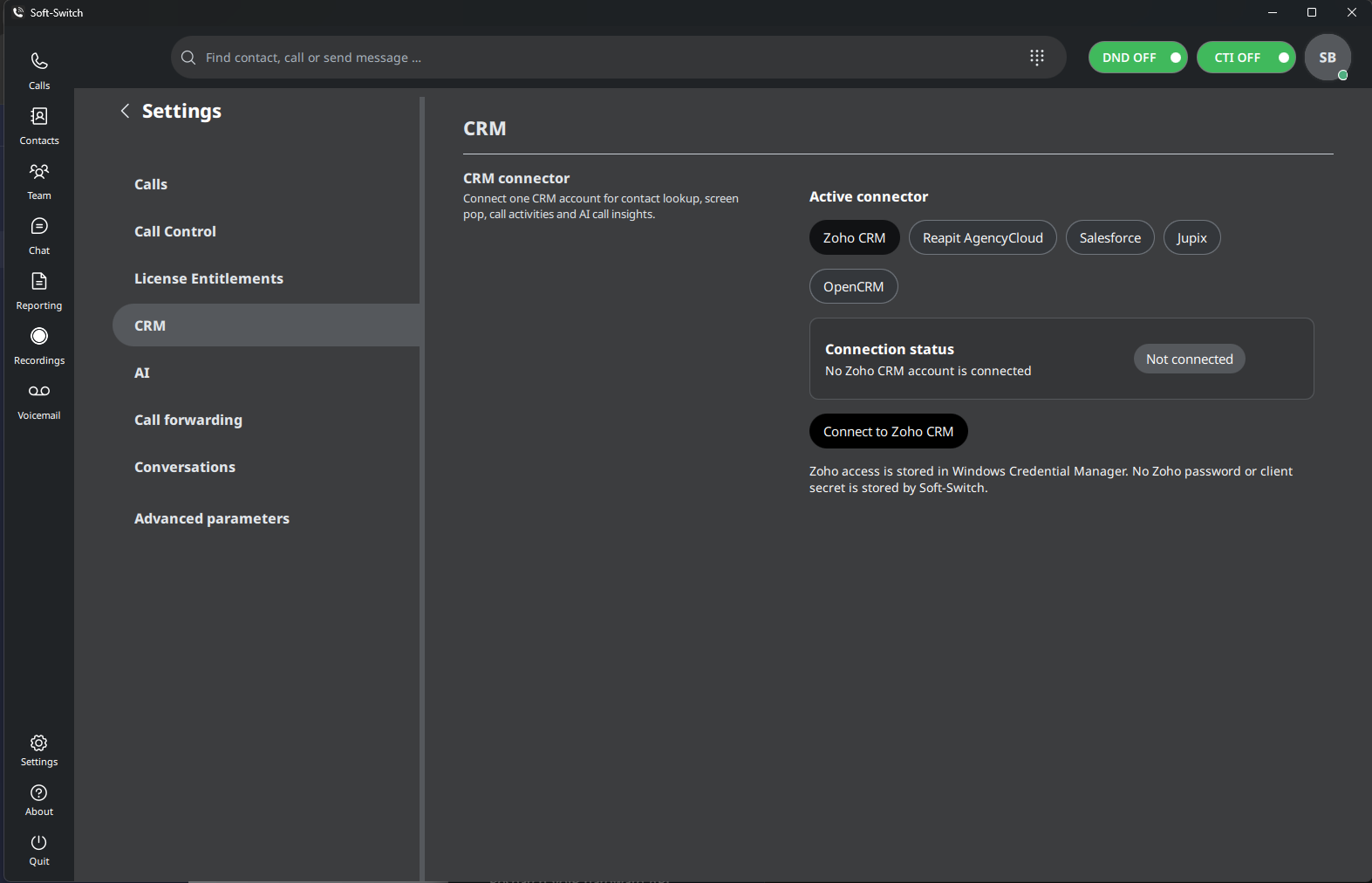
Connect a supported CRM account for contact lookup, caller screen pops, call activities and AI call insights—bringing customer information into the calling workflow.

  • Zoho CRMContact lookup, screen pops and call activity workflows.
  • Reapit AgencyCloudConnected calling for property teams using AgencyCloud.
  • SalesforceBring caller context into established Salesforce workflows.
  • JupixLink business calls with customer and property records.
  • OpenCRMConnect caller context and call activity workflows with OpenCRM.

CRM availability and features depend on your selected connector, account permissions, service configuration and licensing.


CRM CONNECTOR CONNECTED
Soft-Switch VoIP APP CRM settings showing Zoho CRM, Reapit AgencyCloud, Salesforce, Jupix and OpenCRM connectors
ONE ACTIVE CONNECTORConnect the app to the CRM your team already uses.
02
Soft-Switch VoIP APP
PRESENCE LIVE
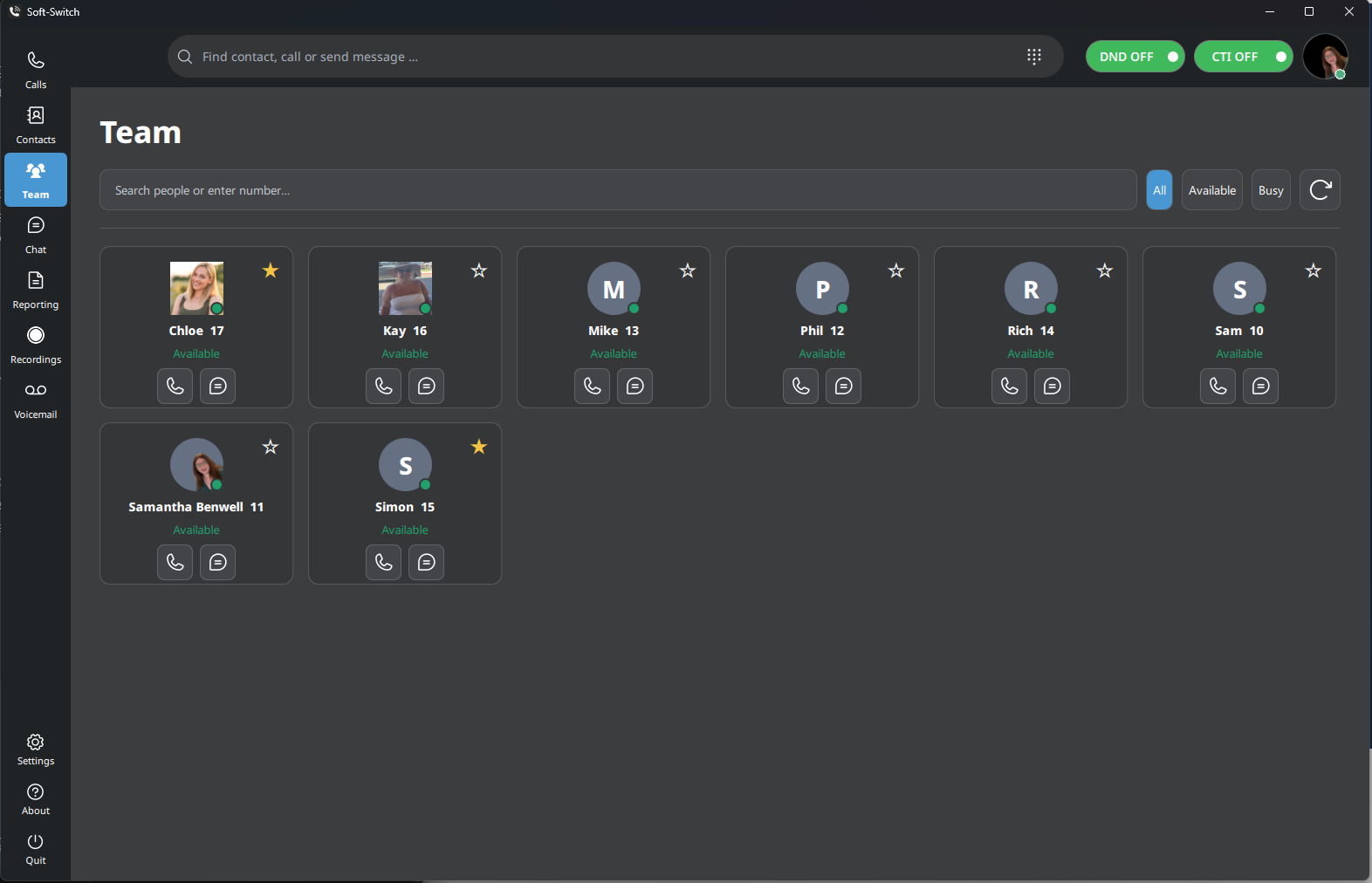
Team presence and colleague availability in Soft-Switch VoIP APP
TEAM PRESENCEAvailability at a glance

Connected teams

02 / PRESENCE

Know who’s availablebefore you call.

Live presence gives teams immediate context. Users can see colleague availability, find the right person and start the next conversation with less friction.

  • Live colleague availabilityUnderstand who is ready, busy or away before making contact.
  • Faster internal collaborationCall or message directly from favourites and the company directory.
  • One experience across locationsKeep office, hybrid and remote teams connected in the same workspace.

Reporting & analytics

03 / OPERATIONAL VISIBILITY

See how your businesscommunicates.

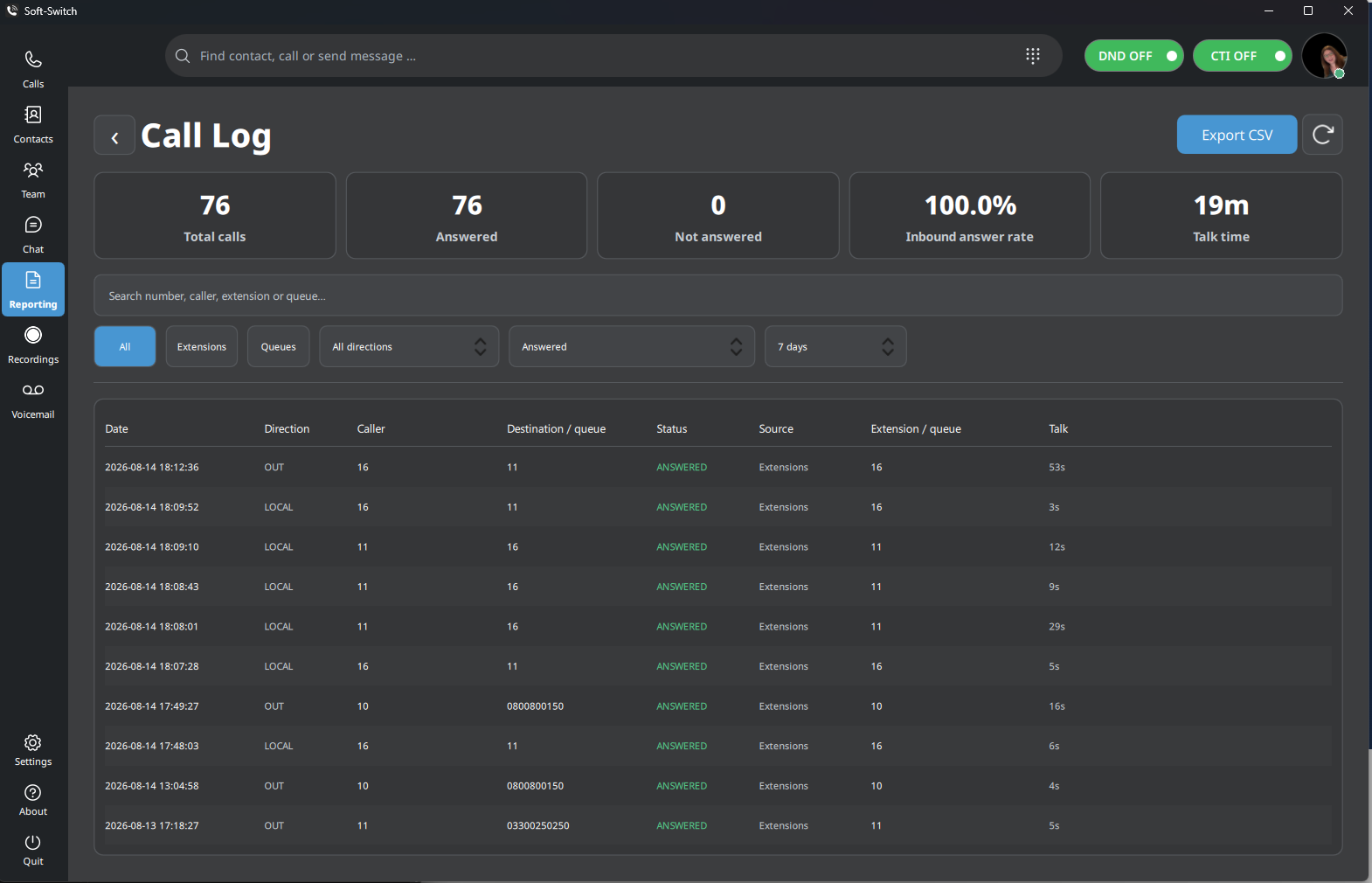
Move beyond individual call records. Authorised users can understand activity, outcomes and service demand from one clear reporting workspace.

  • Call activity and outcomesReview inbound, outbound, answered and unanswered activity.
  • Performance visibilitySee answer-rate and talk-time information without assembling separate reports.
  • Flexible analysisFilter the detail teams need and export call data to CSV.
Reporting workspace
LIVE SERVICE DATA
Call reporting and performance dashboard in Soft-Switch VoIP APP
CALL REPORTINGFilter · Review · Export
OPERATIONAL DETAILFrom service demand to individual calls
04
Recording workspace
LICENSED FEATURE
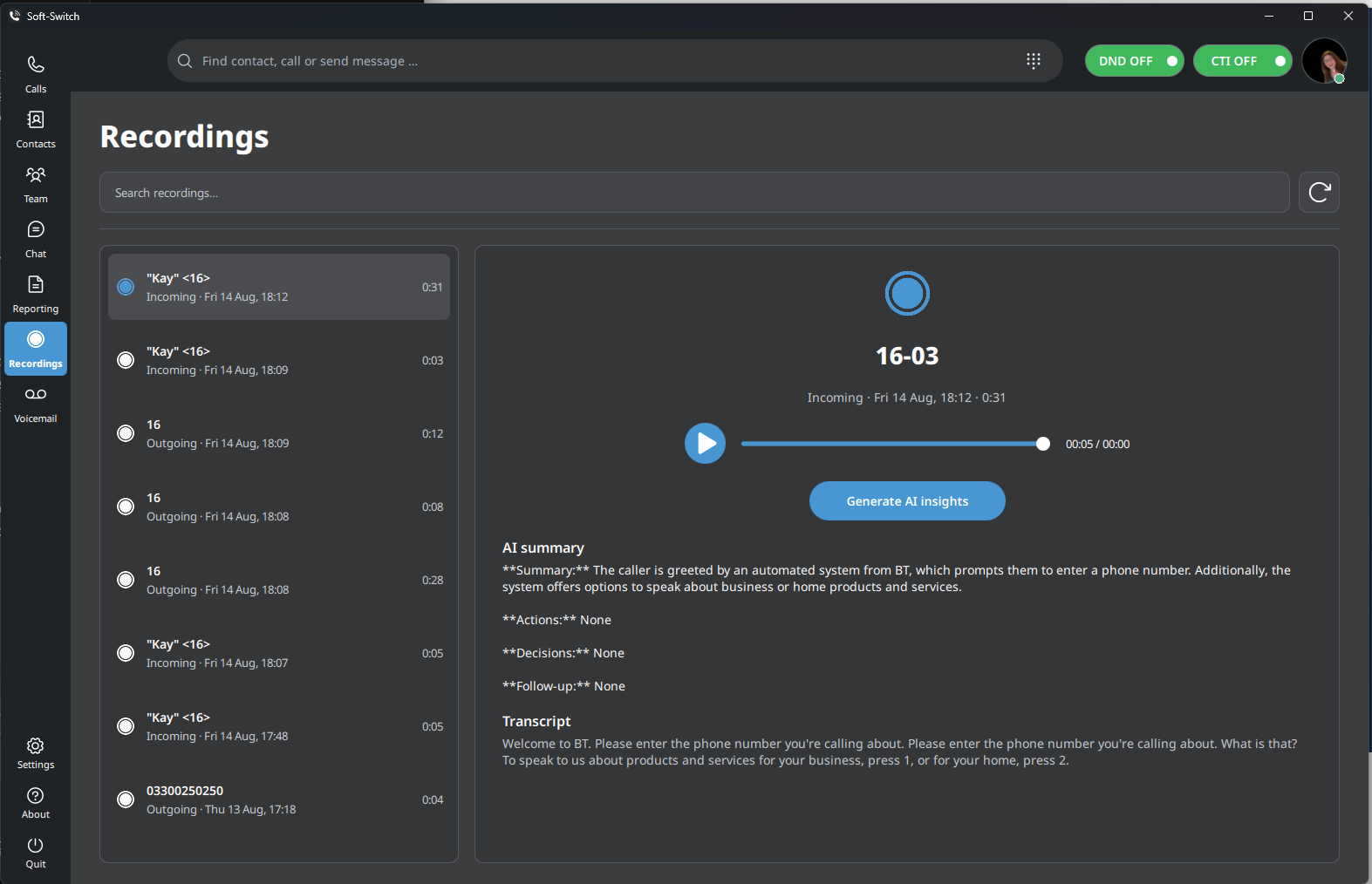
Recording and AI call intelligence workspace in Soft-Switch VoIP APP
AI CALL INTELLIGENCERecording to actionable insight

Licensed AI call intelligence

04 / CONVERSATION OUTCOMES

Turn conversationsinto action.

Where licensed and enabled, available recordings become useful business information—helping authorised users move from listening back to understanding what happens next.

  • 01TranscriptsA searchable written record of the conversation.
  • 02Concise summariesThe essential context without replaying the full call.
  • 03Actions & decisionsClear follow-up points and recorded outcomes.

Availability depends on service configuration, licensing, privacy and consent policies.

Enterprise deployment & management

Built for users.Managed for your organisation.

Soft-Switch VoIP APP is deployed as part of a professionally managed communications service—giving users a consistent application while keeping configuration, releases and support under clear ownership.

MANAGED END TO ENDOne service. One accountable team.
  1. Deployment
  2. Platform
  3. Updates
  4. Support
Discuss your rollout
01

Managed deployment

Planned, configured and introduced around your users and calling requirements.

02

Secure updates

Controlled application updates supported by verified Windows release information.

03

Centralised communications

Users connect to the organisation's managed voice service, identity and routing.

04

UK engineering & support

Ongoing application and platform support from I.T Communications.

05

Scalable deployment

A consistent Windows experience for growing teams and multi-user environments.

Current Windows release

DownloadSoft-Switch VoIP APP.

Install the current 64-bit Windows desktop application. Your organisation must have an active IT Communications voice service and valid user credentials.

Release integrityPublished SHA-256 value
Managed deploymentBuilt for business users
Active service requiredValid user credentials
Need access or assistance?Contact your IT administrator or speak to our team.
Talk to an expert
RELEASE INFORMATION CURRENT
Build
2.0.56
Released
11 September 2026
Platform
Windows x64
Download size
167.9 MB

SHA-2564e58d8673543fff4d1b1f2baed51c136898af4917f2687e765f507479ea049ec

Download Windows installer

What's new

Explore the improvements and fixes in our verified Windows release history.

Read the Windows release history →

See it in your environment

Ready to see Soft-Switch in your business?

Talk to our team about your users, communications requirements and the right deployment for your organisation.